
In Kiro We Trust
Two years ago, a friend of mine reached out to me with a brillian SaaS idea to build together. He is a surgeon, has no clue how to code or how to develop an application, and thought that I can do my magic and build what he is looking for. The problem is, he didn’t know that you need more than just a cloud engineer to build a SaaS app. Backend, frontend, data, network, security, testing, then cloud, maybe? Should I count more layers? So it was impossible, but was still worth calculating and planning.
The number was five digits of euros and we would be done today with technology of back then. Fast forward to now, it took me just a few weeks, and a 20$ a month Kiro subscription to prototype the idea.
I look forward talking about this application much more in the future, but the focus for this post is Kiro. While all the attention is collected over OpenAI Codes, Claude Code and Cursor - Kiro has its own circle with its own capabilities and potential, very similar to everything that I counted (and with some things even better tbh)
- It’s a tool officially built by AWS, and kiro.dev is the site to learn all about it.
- The original use is via IDE (such as VS Code) and I’m used to use Kiro that way, however CLI is also available (and very powerful!) similar to other coding companions in the market as Claude Code.
- Kiro powers is some sort of extension specific to your needs, developed by open source or third party partners. Didn’t have a chance to try yet but I heard good things about it.
- And finally, promptz.dev is your go-to place if you want to get the most out of Kiro. It’s developed by Christian Bonzelet to share good practices and common solutions on your needs. Consider it like a cookbook for Kiro to fit to your special needs.
How do I open a Kiro account?
The official docs recommend to install Kiro and sign up/create a profile by kiro.dev website. But I find it difficult to maintain and I would like to show you an alternative way: Go to your AWS Account and navigate to Amazon Q Developer - this is a not-so-known menu that allows you to generate sub-accounts that you can administer and provide any Kiro usage as you like.

You can easily create a user, or a group in the future if you decide to build your own team. Use the sign-in URL at the right top of the dashboard to sign in to your account while using Kiro.
Trust me. This way is much better and easier to use Kiro.
How do I start using Kiro?
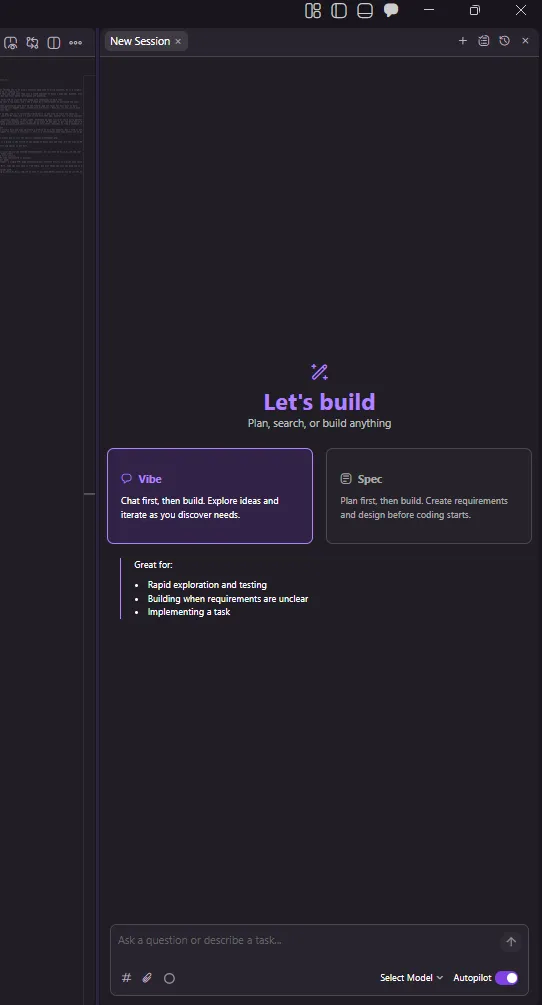
Once you installed Kiro in your local device and handled authentication, all you have to do is to use the chat box at the right side for prompting. For starters, I recommend you these steps:
- Open an empty folder as your first project.
- Use the chat box on the right side (Ctrl+Alt+B or similar)
- Select vibe, with auto as your model
- And ask to build something simple: a single HTML page introducing your favorite artist, or a brief bash script that sorts your files etc.
Just to discover the power of Kiro. Then you will take it from there, and will shine out once you know how to Spec.
This we will talk about, on another post. I hope you will consider giving a chance to Kiro, and let me know if you have better ideas on how to use the tool!